If you are building a radiology AI system that needs to communicate priority information to an EHR or RIS, you will eventually encounter the HL7 FHIR R4 ImagingStudy resource. It is the FHIR representation of a DICOM study — the data structure that tells an EHR "this patient had a CT scan at this time, with this accession number, this modality, and these series." For radiology AI vendors, the ImagingStudy resource is also the natural place to attach priority annotations and triage findings in a way that FHIR-capable downstream systems can consume.
This article walks through the ImagingStudy resource structure in enough technical detail to be useful for integration engineers and hospital IT teams evaluating how AI triage priority updates flow from Pacslens into Epic Radiant or other FHIR-capable RIS and EHR systems.
The ImagingStudy Resource: Core Structure
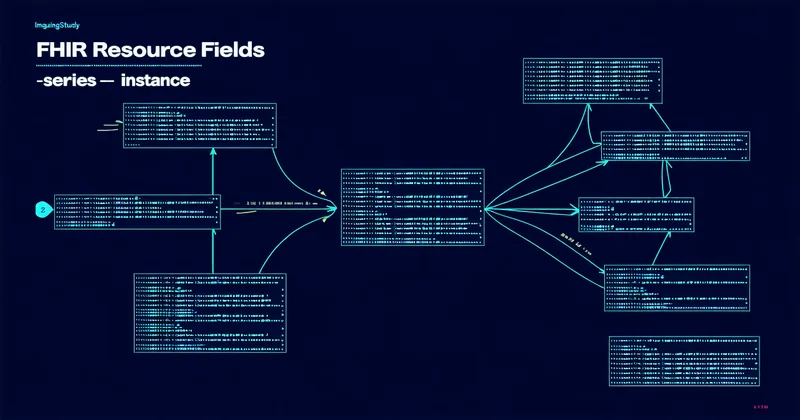
In FHIR R4 (HL7 FHIR Release 4), the ImagingStudy resource is defined at http://hl7.org/fhir/R4/imagingstudy.html. Its primary purpose is to represent the metadata and organization of a DICOM imaging study without requiring the consumer to speak native DICOM. The resource maps directly to DICOM Study and Series level attributes.
Key fields relevant to radiology AI integration:
identifier: carries the DICOM Study Instance UID as a system/value pair, enabling correlation between the FHIR resource and the DICOM object in PACSstatus: vocabulary-controlled (registered, available, cancelled, entered-in-error); AI systems typically interact with studies inavailablestatussubject: reference to the Patient resource — the PHI linkage pointencounter: reference to the Encounter resource, linking the imaging study to the clinical encounter context in the EHRstarted: dateTime of study acquisition — the timestamp used for worklist queue position before triage re-rankingseries[]: array of series-level objects, each containing modality, series UID, and instance referencesnote[]: Annotation array — the simplest place to attach free-text priority notes, though structured extension fields are preferred for machine-readable priority dataextension[]: FHIR extension mechanism for data not in the base resource definition
Where Priority Annotations Live
There is no base R4 ImagingStudy field called "priority" or "triage score." This is a known gap in the specification — DICOM has rich metadata for clinical urgency (the DICOM attribute (0040,A493) Observation Category and related attributes in SR objects), but the ImagingStudy FHIR resource does not provide a standard field for AI-generated priority scores.
There are three approaches in common use for attaching AI priority data to an ImagingStudy resource:
Approach 1: ImagingStudy.note
The note field (type Annotation) accepts a plain-text string and a timestamp. A simple implementation writes the triage score as a note string: "Pacslens triage score: 87/100 — ICH detection positive". This is readable by humans viewing the resource in an EHR but is not machine-parseable by downstream clinical decision logic without string parsing. Useful for initial integration; not preferred for production automation.
Approach 2: FHIR Extension on ImagingStudy
A custom FHIR extension with a defined URL (e.g., https://pacslens.com/fhir/StructureDefinition/triage-priority) and a ValueType of CodeableConcept or integer allows structured, machine-readable priority data. The extension URL is registered in the StructureDefinition and referenced in the ImagingStudy resource instance. Systems consuming the resource can look for the known extension URL and parse the triage score without string manipulation.
The limitation of custom extensions is interoperability: a system receiving the ImagingStudy with a Pacslens-specific extension URL must be programmed to look for that URL. Epic Radiant's FHIR server, for example, will store the extension as received but will not automatically surface it in the radiologist's worklist unless the Epic implementation has been configured to map that extension field to a worklist column.
Approach 3: Companion DiagnosticReport
The FHIR R4 DiagnosticReport resource is a better fit for structured AI findings than ImagingStudy, because DiagnosticReport has explicit fields for result (references to Observation resources), conclusion (coded clinical conclusion), and conclusionCode (SNOMED CT or RadLex coded finding). A DiagnosticReport linked to the parent ImagingStudy via imagingStudy[] reference carries the AI triage output as a structured clinical artifact with status tracking (preliminary, final, amended) and Observation result values.
This is the approach Pacslens uses for EHR-facing result delivery. The DiagnosticReport with status preliminary and Observation resources containing the triage score and indication-specific finding flags is written to the FHIR server after inference completes. It can be consumed by Epic's clinical decision support rules, by Cerner's CareAware framework, or by any FHIR R4 consumer that processes DiagnosticReport resources.
Epic Radiant and the FHIR Implementation Reality
Epic Radiant is the RIS module within Epic and the most common radiology information system in community hospitals that run Epic as their primary EHR. Epic exposes FHIR R4 APIs via its SMART on FHIR and Interconnect platforms. The ImagingStudy resource is available via Epic's FHIR R4 endpoint (search by patient, by encounter, or by identifier containing the DICOM Study Instance UID).
For AI vendors writing priority data into Epic Radiant, the practical pathway as of mid-2025 depends on where the hospital's Epic implementation is configured. Epic's App Orchard program allows third-party clinical apps to register as SMART on FHIR applications and receive scoped access to the FHIR API. Pacslens is in the Epic App Orchard evaluation process, which involves completing the vetting workflow and establishing a sandbox integration environment.
Without App Orchard approval, AI triage priority data can still be delivered to Epic via the Epic Bridges HL7 v2 interface — specifically via HL7 v2 ORM (Order Message) extensions or a custom OBX segment in the ORU (Observation Result) message following study completion. The HL7 v2 path is available in essentially all Epic installations because every hospital has configured HL7 v2 interfaces for PACS-to-Epic communication. It is also less elegant than FHIR because the ORM/ORU message structure was not designed for AI priority annotations, requiring custom segment mapping in Epic's ADT/Bridges interface builder.
SIU Messages and Scheduling Integration
The HL7 SIU (Scheduling Information Unsolicited) message type is used for scheduling notifications — appointment creation, modification, cancellation — between systems. For radiology AI triage, SIU messages are not directly relevant for priority annotation, but they matter for MWL (Modality Worklist) scenarios where the AI system needs to know that a patient is scheduled for a study before the study is acquired. Some pre-scan triage architectures use MWL query results (DICOM C-FIND on the MWL service) to identify high-risk patients before imaging based on prior clinical context, but this is an advanced integration pattern beyond the scope of most community hospital AI deployments.
What Hospital IT Teams Should Validate Before Go-Live
For any FHIR-based radiology AI integration into an Epic environment, the technical validation checklist should include: Does the AI vendor have a registered SMART on FHIR application or an equivalent Epic-approved API integration? Are ImagingStudy resources being written with the correct DICOM Study Instance UID in the identifier field, enabling round-trip correlation? Is the DiagnosticReport resource linked to the correct ImagingStudy via imagingStudy[]? Is the FHIR write operation using the correct FHIR server base URL for the hospital's Epic installation (which differs between production and test environments)?
These questions are not abstract. A mismatched Study Instance UID in the ImagingStudy identifier will prevent correlation between the FHIR result and the DICOM study in PACS, breaking the end-to-end data flow even if both systems are individually functional. This class of integration failure is common in early deployments and almost always traceable to UID handling at the FHIR resource creation step.
Working through a FHIR integration for radiology AI and want to understand how Pacslens handles ImagingStudy resource management in Epic Radiant environments? Reach our integration team directly.